One of the most common anxieties I hear from business owners when we discuss digital transformation is the “rip and replace” fear. You’ve spent years, perhaps decades, refining your legacy systems. You have a proprietary database that holds your “secret sauce,” or a specialized accounting tool that your finance team knows like the back of their hand. The thought of throwing it all away to move to a new ecosystem feels less like progress and more like a heart transplant.
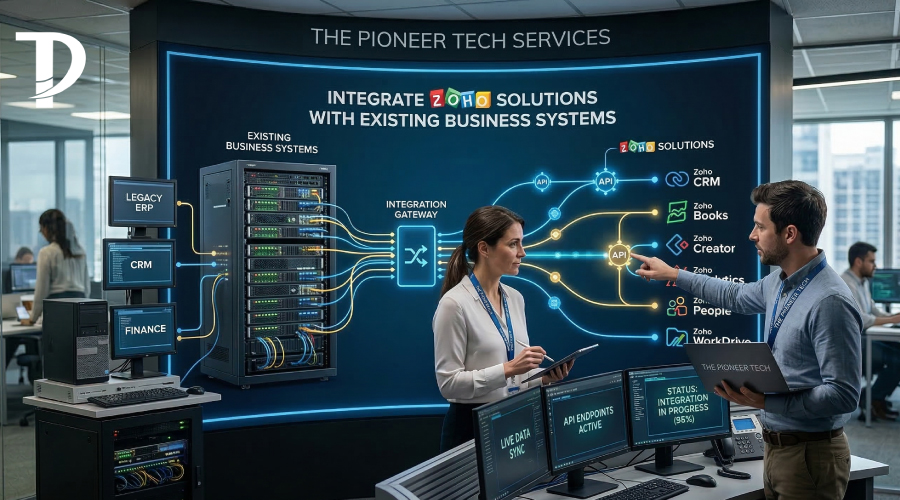
As a consultant, my philosophy is different. I don’t believe you should have to choose between your history and your future. The true power of modern technology lies in its ability to play well with others. When we Integrate Zoho Solution strategies into a business, we aren’t just adding a new tab to your browser; we are building a bridge between where you are and where you want to go.
The “Silo” Problem: Why Integration is No Longer Optional
In a perfect world, every piece of software in your office would share a single brain. In reality, most businesses operate in “silos.”
- Sales uses a CRM.
- Marketing uses a separate email tool.
- Finance uses an isolated ERP.
- Customer Support has a ticket system that doesn’t know the customer’s purchase history.
When these systems don’t talk, your employees become the “human glue.” They spend 30% of their day manually copying data from Point A to Point B. This isn’t just a waste of talent; it’s a massive risk for human error. One mistyped decimal point in an integration-less environment can cost thousands of dollars.
To Integrate Zoho Solution architectures means to eliminate the “human glue” and replace it with automated, real-time data flow.
Our Approach: The 3 Methods of Integration
Every business ecosystem is different, which is why we don’t use a one-size-fits-all approach to connectivity. Depending on your current tech stack, we utilize three primary methods to ensure Zoho feels like a native part of your company.
- Native Zoho Marketplaces (The “Easy Button”)
Zoho has invested millions in building direct connectors. If you use popular tools like Microsoft 365, Google Workspace, Slack, or QuickBooks, we can often sync these in a matter of hours. These are robust, two-way syncs that ensure when you update a contact in Outlook, it reflects in Zoho CRM instantly.
- Middleware Orchestration (The “Smart Bridge”)
Sometimes, you need a bit more logic. Perhaps you want data to move from your e-commerce site to Zoho Inventory, but only after the payment has been cleared by a third-party gateway. In these cases, we use middleware like Zoho Flow or Zapier. These tools allow us to create “If This, Then That” scenarios that handle complex business logic without requiring a developer to write thousands of lines of code.
- Custom API Development (The “No-Limits” Solution)
For businesses with highly specialized, legacy, or on-premise software, we go deep into the code. By using Zoho’s REST APIs, we can build custom “webhooks” that allow Zoho to communicate with virtually any software that has an internet connection. This is where we turn “impossible” into “integrated.”
Real-World Scenarios: Zoho in the Wild
To understand the impact, let’s look at how we Integrate Zoho Solution components for clients in various sectors:
The E-commerce Powerhouse
A client came to us using Shopify for sales, ShipStation for logistics, and a legacy SQL database for their loyalty program. They were drowning in spreadsheets. The Zoho Implementation Solution: We integrated Zoho Inventory as the “Central Source of Truth.” Now, when a sale happens on Shopify, Zoho automatically checks the SQL database for loyalty points, updates the stock levels, and pushes the shipping labels to ShipStation. No manual entry, no overselling.
The Service-Based Consultant
A legal firm used a specialized case management tool but lacked any marketing or billing automation. The Solution: We kept their case management tool (because it was legally required) but built a custom API bridge to Zoho Books and Zoho Campaigns. Now, when a case is marked “Closed” in their old system, Zoho Books automatically generates the final invoice, and Zoho Campaigns adds the client to a “Post-Service Feedback” loop.
Overcoming the “Legacy System” Hurdle
“But my software is twenty years old and sits on a server in my basement!”
I hear this more often than you’d think. Even in these cases, integration is possible. We can often set up automated “Data Imports/Exports” or use RPA (Robotic Process Automation) to bridge the gap. The goal is to move away from the “all-or-nothing” mentality. You can keep the parts of your old system that still provide value while letting Zoho handle the modern heavy lifting like mobile access, AI forecasting, and cloud collaboration.
5 Benefits of a Properly Integrated Zoho Ecosystem
When we successfully Integrate Zoho Solution workflows into your existing business, you’ll notice five immediate shifts:
- Data Consistency: No more arguing over which report is “correct.” There is only one version of the truth.
- Increased Productivity: Your team stops acting like data-entry clerks and starts acting like strategists.
- 360-Degree Customer View: Your sales team can see support tickets, and your support team can see sales history. This leads to a much more “human” customer experience.
- Real-Time Analytics: You don’t have to wait until the end of the month to see your numbers. You can see them in a Zoho Analytics dashboard that pulls from all your systems simultaneously.
- Cost Savings: By automating redundant tasks, most of our clients see the integration pay for itself within the first six months.
The Consultant’s Role: Why You Shouldn’t “DIY” Integrations
While Zoho makes it look easy to click a “Connect” button, the logic behind data flow is tricky. If you map a field incorrectly, you could accidentally overwrite 10,000 customer records in seconds.
As your consultant, my job is to act as the “Architect.”
- Security: We ensure that data is encrypted and compliant with GDPR or HIPAA where necessary.
- Error Handling: We build “failsafes” so that if one system goes down, the data isn’t lost—it’s queued and sent once the connection is restored.
- Optimization: We don’t just sync data; we look for ways to make the data better as it moves between systems (cleaning, formatting, and enriching).
The Future-Proofing Factor
Technology moves fast. The system you use today might be obsolete in five years. By choosing to Integrate Zoho Solution modules through a standardized API-first approach, you are making your business “pluggable.” If you decide to change your accounting software in three years, we simply unplug the old one and plug in the new one to the Zoho hub. You don’t have to rebuild your entire workflow.
Conclusion:
Business is hard enough without your software working against you. If you feel like you’re managing a dozen different “islands” of information, it’s time to build some bridges.
At The Pioneer Tech, we specialize in the “invisible work”—the connections, the syncs, and the automations that make your business feel like a single, cohesive unit. You don’t have to abandon the tools that got you this far; you just need to give them a modern voice.